
An ASIN is Amazon’s unique 10-character ID for every product in its catalog. No ASIN, no listing. No listing, no sales. Simple as that.
Now, if you’re buying wholesale to resell on Amazon, ASINs aren’t just trivia. They’re working tools. Your supplier sends a catalog full of UPCs and SKUs. Amazon speaks ASIN. Learning to translate between the two? That’s what separates sellers who buy smart from sellers who buy blind.
What ASIN Actually Stands For
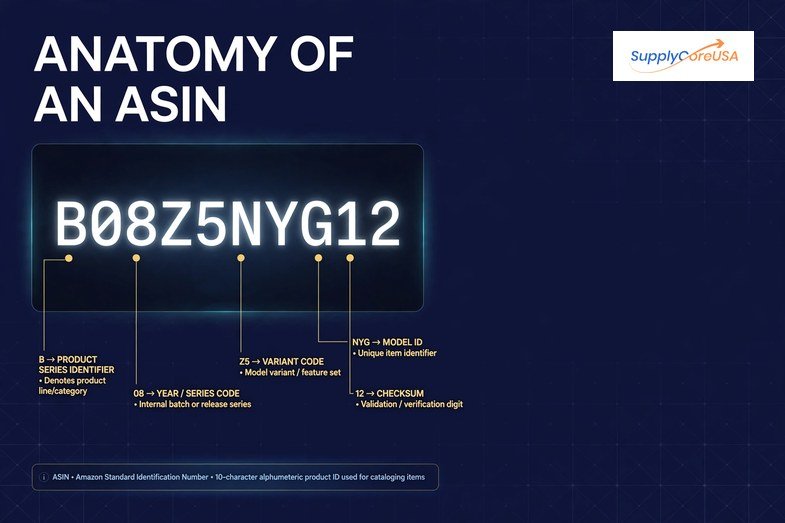
ASIN means Amazon Standard Identification Number. Ten characters, letters and numbers mixed together. Looks something like B08Z5NYG12.
Most of them start with B0. Books break the rule, their ASIN is just the ISBN. Fine. Exceptions exist.
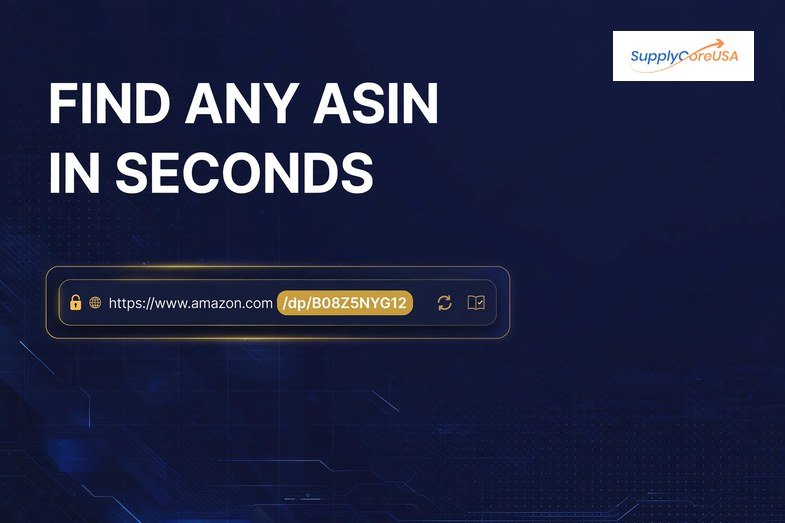
And get this, it’s not a barcode. You don’t print it on anything. It lives inside Amazon’s system. In the product URL (right after /dp/, go look). In the product details section if you scroll down. All over Seller Central. One product gets one ASIN. Sell a red one and a blue one? Two ASINs. That’s how Amazon keeps its catalog of hundreds of millions of products from collapsing into chaos.
Why Wholesale Sellers Should Care More Than Anyone
Okay. Most ASIN explainers stop at the definition and call it a day. Useless for you. Here’s what actually matters when you’re buying inventory.
Look up the ASIN before you order. Always. Supplier catalog in hand, product looks good, price looks good. Stop. Search that product on Amazon first. ASIN exists? Great, now you can see the real picture. Sales rank. Review count. Buy box price. How many other sellers are already fighting over it. That’s your profitability check, and it costs you nothing. No ASIN? Then you’re building a listing from scratch. Zero reviews, zero history. Might still be worth it. But you deserve to know which game you’re playing before money leaves your account.
Match the exact product, not the close-enough product. Amazon cares about this a lot. Your wholesaler’s 12-pack is not the same as the ASIN for the 6-pack. List on the wrong one and you’re asking for trouble. Policy trouble, not just a slap on the wrist. Check the ASIN details against what’s actually in the box you’re buying. Every single time. No shortcuts here.
Ungating runs on ASINs behind the scenes. When Amazon asks for invoices to ungate your brand or category, those invoices need to trace back to real products. Real products have ASINs. An invoice for mystery stock with no ASIN trail? That’s the kind of paperwork that gets rejected, and then you’re emailing seller support for weeks. Ask me how I know sellers hate that part. (Everyone hates that part.)
ASIN vs UPC: The Mix-Up That Won’t Die
Nearly every new wholesale seller confuses these two at first. Let’s kill the confusion for good.
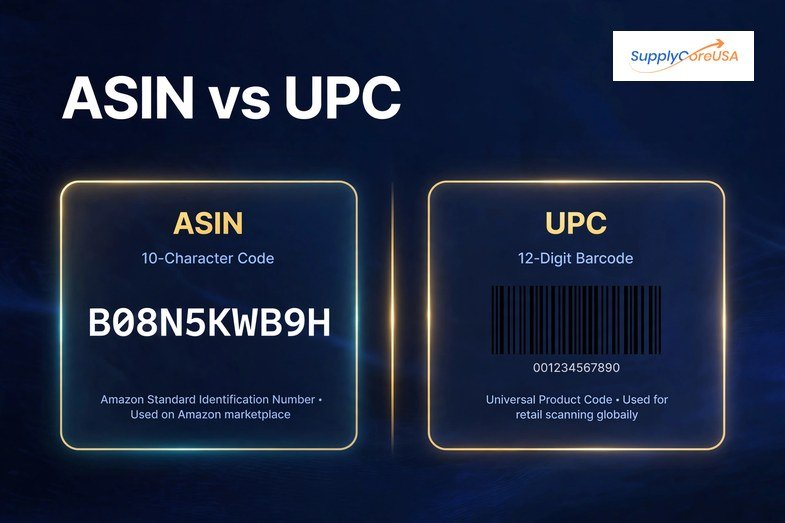
UPC is the barcode on the physical item. Twelve digits. You buy UPCs from GS1 (or your supplier already put one on the product). It works everywhere, Walmart, eBay, your own Shopify store, anywhere.
ASIN is Amazon’s private ID. Amazon-only. Amazon creates it the moment a product enters its catalog. You never buy an ASIN. You never print one.
So the real-world flow? Manufacturer makes a product, slaps a UPC on it. First seller lists it on Amazon. Amazon assigns an ASIN. Done. From that point on, every seller with that exact same product lists under that same ASIN. One listing, many sellers. That’s the whole wholesale model on Amazon in one sentence, by the way.
Which means your daily translation job as a wholesale seller is dead simple. UPC in from the supplier spreadsheet. ASIN out from Amazon search. Do it for every product before you buy. Make it a habit like checking the price.
Where ASINs Come From (You Don’t Apply for Them)
Nobody fills out an ASIN application. There’s no form. Here’s what actually happens.
You go into Seller Central, hit Add a Product, type in what you’re selling. Amazon searches its catalog. Match found? It hands you the existing ASIN and you list your offer right there. No match? You create a new listing, fill in the details, and Amazon generates a brand-new ASIN when it goes live. Automatic.
Small catch, though. New listings usually need a GTIN, that’s the number behind the UPC barcode. No GTIN on your wholesale products? Then you need a GTIN exemption from Amazon first. Separate application. Not hard, but it takes time, so handle it before your first shipment lands, not after. Future you will be grateful.
Frequently Asked Questions
What does ASIN mean for Amazon?
Everything, honestly. The ASIN is what holds Amazon’s entire catalog together. It’s how Amazon tracks each product, lumps every seller’s offer for the same item onto a single detail page, runs its warehouses, and powers search. Hundreds of millions of products, all organized by these little 10-character codes. Take ASINs away and the whole thing falls apart.
How do I get an ASIN number for Amazon?
You don’t, not directly. There’s no ASIN store. List a product in Seller Central that isn’t in Amazon’s catalog yet, and Amazon creates the ASIN for you automatically when the listing goes live. Product already on Amazon? Even easier. Just list your offer on the existing ASIN and you’re done.
Where is ASIN in Amazon?
Easiest method on earth. Open any product page, glance at the URL. See /dp/ in there? The 10 characters right after it, that’s the ASIN. Too lazy to read URLs? Scroll down to the product details section. It’s listed there too, labeled ASIN. Can’t miss it.
How do I find my ASIN?
Your own listing? Seller Central, inventory page, it’s sitting right next to each product name. Staring at you. Someone else’s product? URL or product details section, same as above. Takes five seconds once you know where to look.
How do I look up an asin number?
Type the product name into Amazon search, open the listing, check the URL. Doing a bunch at once? Take the UPCs from your supplier sheet and punch them into Amazon’s search bar one by one. Or use the Add a Product tool in Seller Central, it’ll show you the matching ASIN the second it finds your product. Whichever’s faster for you.
Where do I find my asin number?
Same answer as above, because it’s the same question wearing a different hat. Seller Central inventory dashboard, right beside the listing. Live product page, in the URL after /dp/ and down in product details. And if you created the listing yourself, Amazon showed you the ASIN the moment it went live. Check your email confirmations if you’re really stuck.
Does Amazon still use ASIN numbers?
Oh, absolutely. Still the foundation of everything in 2026. Product pages, warehouse scanners, Seller Central reports, advertising, all of it runs on ASINs. Anyone telling you otherwise is selling something. This isn’t changing anytime soon.
What It All Comes Down To
Small code, big consequences. The ASIN decides what you should buy, whether a listing has reviews working in your favor, and whether your ungating paperwork survives first contact with Amazon’s review team.
So here’s the habit. Supplier sends a catalog, you translate UPCs to ASINs before ordering. Check the competition. Check the rank. Then buy like someone who did their homework, not someone crossing their fingers.
Buying wholesale inventory for Amazon FBA? SupplyCore USA works with sellers on vetted wholesale stock, invoices that actually hold up for ungating, and prep shipped straight to FBA warehouses. Talk to us about what you’re looking to source.