
With WFS Inventory Transfer Service, you ship every sortable unit to one Walmart transfer station and pay a small per-unit fee while Walmart spreads your inventory across fulfillment centers nationwide. Anyone moving wholesale quantities through Walmart Fulfillment Services knows the pain this kills: no more splitting each inbound across three or four warehouses on your own.
I started paying attention to ITS when a few of our wholesale buyers asked why their competitors’ Walmart listings kept showing 2-day delivery in states far from their home warehouse. The answer, most of the time, was that their inventory was sitting in a dozen fulfillment centers instead of one. ITS is Walmart’s official way to get that kind of coverage without running your own multi-warehouse operation.
What Is the WFS Inventory Transfer Service?
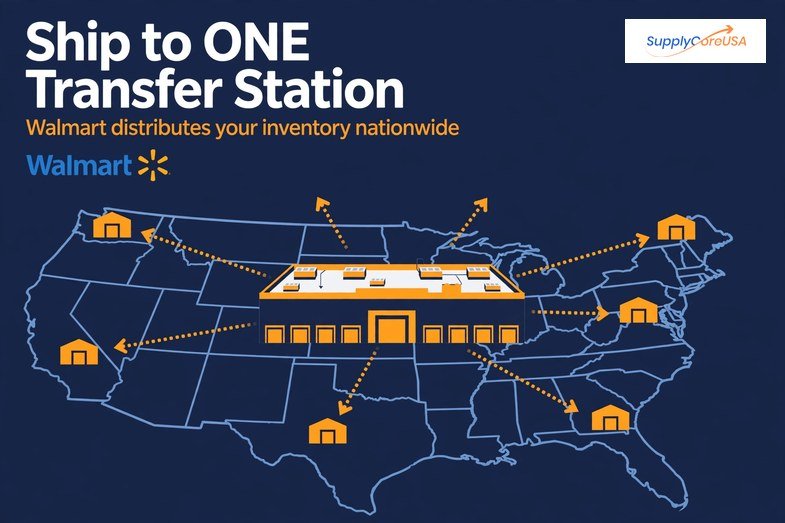
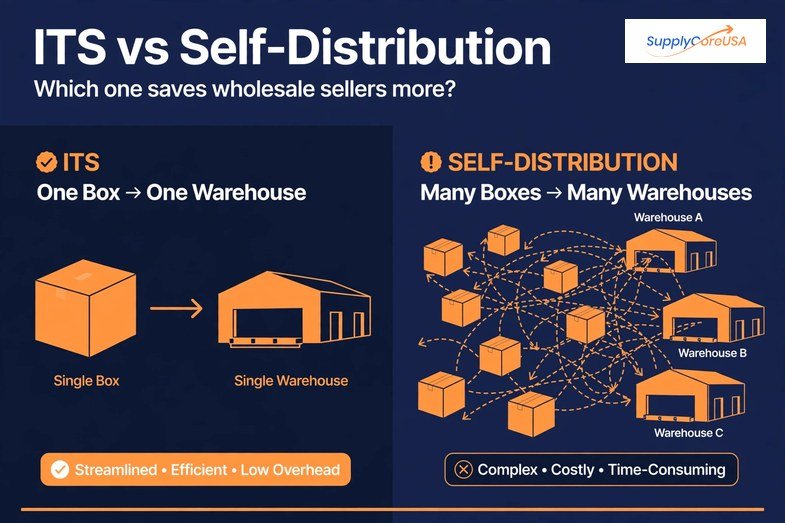
Inventory Transfer Service is an optional WFS program. Normally Walmart hands you a list of fulfillment centers and you carve each inbound shipment into pieces yourself. ITS flips that. Everything goes to one transfer station, and Walmart’s team breaks it into outbound shipments headed for fulfillment centers around the country. They pick destinations using stock levels and where demand actually is.
Picture a normal week without ITS. Your shipping plan says 300 units to Texas, 200 to Pennsylvania, 150 to California. That is three pack jobs, three pickups to schedule, three tracking numbers to babysit. With ITS, all 650 units go to one transfer station in a single shipment, and Walmart takes it from there.
Walmart’s own case study on this is SJK Enterprises, a seller that was struggling with delivery speeds from a single Illinois location. After switching to ITS, their products were positioned in over a dozen fulfillment centers, which put them close enough to coastal customers for next-day delivery across a wider area. Walmart claims sellers using ITS see an average GMV lift of nearly 15 percent.
How ITS Works, Step by Step
It plugs straight into the inbound routine you already run:
- Build your shipping plan in Seller Center exactly like you normally would. At the shipment creation step, you will see two options: use ITS or distribute inventory yourself.
- If you choose ITS, Walmart assigns you a single transfer station as the shipping destination for your sortable items.
- You ship everything to that one station. One destination, one shipment to manage, one tracking number to watch.
- Walmart distributes your inventory from the transfer station to fulfillment centers across the country.
- Your listings go live as inventory arrives at each destination. Walmart’s guides cite different timelines here, so plan conservatively: one guide says some inventory may be available to sell within 4 business days of reaching the transfer station, while another cites roughly 10 to 15 business days depending on the destination fulfillment center.
One practical note: a portion of your inventory can be reserved for sale while the rest is still being distributed, so you are not sitting on zero sellable stock during the transfer.
What Does ITS Cost in 2026?
Walmart publishes a per-unit fee table for the transfer service, based on shipping weight:
| Shipping weight | ITS fee per unit |
|---|---|
| 1 lb or under | $0.25 |
| 1+ to 2 lb | $0.35 |
| Over 2 lb | $0.35, plus $0.10 for every lb past 2 lb |
Do the quick math on your own catalog. A 1.5 lb unit runs $0.35 to transfer; a 5 lb unit runs $0.65. At wholesale quantities that is real money, so stack it against the alternative: paying freight on several split shipments, booking extra parcel or LTL pickups, more hours of packing labor, and more chances for a shipment to go sideways.
Here is the timely part. ITS is free for all ITS shipments booked and delivered to the final destination fulfillment centers through December 31, 2026. If you have been on the fence about trying it, the rest of this year is the cheapest possible test window. Rates can change, so confirm the current fee table in your Seller Center before you commit to a large shipment.

Who Can Use ITS? (Eligibility)
ITS works with sortable inventory only. That means items under 25 lb with maximum dimensions of 25 by 20 by 14 inches and volume under 1.6 cubic feet. If your products are oversized, they will go through the standard self-distribution flow.
On availability, Walmart’s documentation is a little inconsistent. One guide describes ITS as available to a select group of WFS sellers based on inventory type, while another describes it as available to all WFS sellers through enrollment. The consistent instruction across both: contact your account manager or WFS Support to request enrollment and approval. Once approved, you will see the ITS option when creating inbound shipments. Note also that ITS currently applies to FTL or LTL shipments, not parcel shipments, so plan your freight accordingly.
If you are new to WFS entirely, start with our breakdown of what fulfilled by Walmart means and then read our WFS shipping plan walkthrough before you set up your first ITS shipment.
Should You Use ITS or Distribute Inventory Yourself?
No universal answer here. It comes down to two things: how big your shipments are, and what your time is worth.
Choose ITS when:
- Nationwide 2-day coverage sounds great, but running your own multi-warehouse spread does not.
- Since your freight already moves as FTL or LTL, the mode requirement is a non-issue.
- You would rather skip the weekly puzzle of dividing every inbound across the assigned fulfillment centers.
Choose self-distribution when:
- Splitting small shipments is trivial enough that the extra freight barely registers.
- Your products are oversized or non-sortable, which rules ITS out anyway.
- You have cheap, reliable freight relationships to each assigned fulfillment center and the math beats the per-unit ITS fee.
- Regional stock control matters to you more than convenience, so you would rather place inventory yourself.
Most wholesalers moving serious volume will find ITS cheaper once everything is counted, and the waived fee through end of 2026 makes the test nearly free. Still, run the numbers on one real shipment before you commit. Total up split-shipment freight plus labor plus packaging, then compare that against the per-unit ITS fee on the same units. Wholesalers are usually surprised by how much the hidden labor costs.
How to Enroll in ITS
- Confirm your products are sortable under the size and weight limits above.
- Contact your Walmart account manager or WFS Support and request ITS enrollment.
- Once approved, create a shipping plan in Seller Center as normal.
- At the shipment step, select the ITS option instead of self-distribution.
- Ship everything to the single assigned transfer station and let Walmart distribute it.
That is the whole process. The enrollment step is the only part that takes any back-and-forth, so start it before you actually need it, not the day your inventory is ready to move.
Frequently Asked Questions
How much does the WFS Inventory Transfer Service cost?
$0.25 per unit for items 1 lb or under, $0.35 for 1 to 2 lb, and $0.35 plus $0.10 per lb over 2 lb, though it is free for qualifying shipments through December 31, 2026.
Is WFS Inventory Transfer Service free right now?
Yes, ITS shipments booked and delivered to final destination fulfillment centers are free through December 31, 2026.
Who is eligible for ITS?
WFS sellers with sortable inventory (under 25 lb, within 25x20x14 inches and 1.6 cubic feet); enrollment is requested through your account manager or WFS Support.
How long does inventory transfer take?
Walmart’s guides vary, citing 4 business days on the fast end and roughly 10 to 15 business days depending on the destination fulfillment center, so plan conservatively.
Should I use ITS or ship to fulfillment centers myself?
Use ITS for wholesale-volume sortable shipments where splitting across multiple fulfillment centers costs you time and freight; self-distribute small or oversized shipments.
Does ITS work for parcel shipments?
No, ITS currently applies to FTL or LTL shipments only, not parcel shipments.
The Bottom Line for Wholesale Sellers
If you are moving wholesale volume through WFS, the Inventory Transfer Service removes one of the most annoying parts of the job: splitting every inbound across half a dozen warehouses. Ship to one station, let Walmart fan it out, and get your products within 2-day reach of customers nationwide. With the fee waived through the end of 2026, there has rarely been a cheaper time to test it on a real shipment.
SupplyCore USA works with wholesale sellers scaling on Walmart and Amazon. If you need a reliable wholesale supplier behind your WFS listings, apply for a wholesale account and let’s talk.